


Lockly Home
3.894.00 Reviews
App Specs
- Version
- 1.5.7
- Updated On
- License
- Free
- Downloads
- 50,000+
- Developer
- PIN Genie Inc.
- Categories
- House & Home
- Platform
- Android
Screenshots
 Analysis by AppCompare
Ever wished you could control your home security with just a tap on your phone? Well, let me introduce you to Lockly Home, a nifty app that’s got your back when it comes to keeping your home safe and sound. I’ve been using it for a while now, and I’m excited to share my thoughts with you.
Getting Started with Lockly Home
The first thing you’ll notice about Lockly Home is how easy it is to set up. Seriously, it’s a breeze! After downloading the app from the App Store or Google Play, I was up and running within minutes. The app walks you through the process of connecting your smart lock to your phone, and it’s as simple as following a few prompts. No tech wizardry required, just a straightforward setup that anyone can handle.
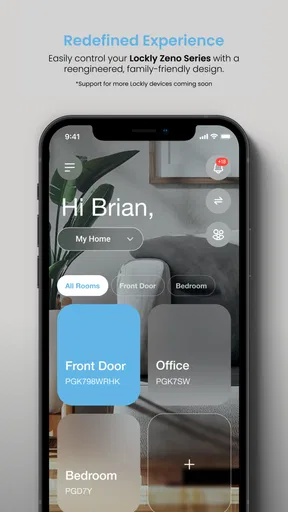
Once connected, you’ll find a sleek and intuitive interface that feels like second nature. Navigating through the app is as smooth as butter, and the layout is super user-friendly. Whether you’re tech-savvy or a newbie, you’ll feel right at home here.
Features That Stand Out
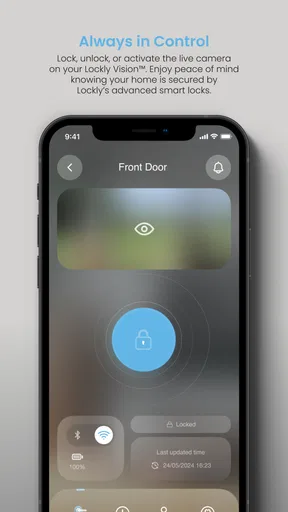
Now, let’s talk features. Lockly Home is packed with them, and they’re genuinely useful. One of my favorites is the ability to control the lock remotely. Forgot to lock the door while rushing out? No worries, just tap your phone, and you’re good. It’s like having a personal security guard in your pocket.
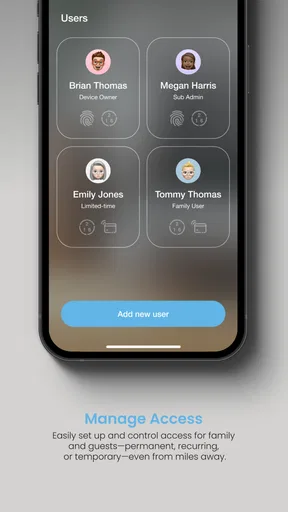
Then there’s the fingerprint access. This feature is a game-changer, offering a quick and secure way to unlock your door. Plus, you can add multiple fingerprints, which is perfect for families. No more losing keys or forgetting codes—just a simple touch and you’re in.
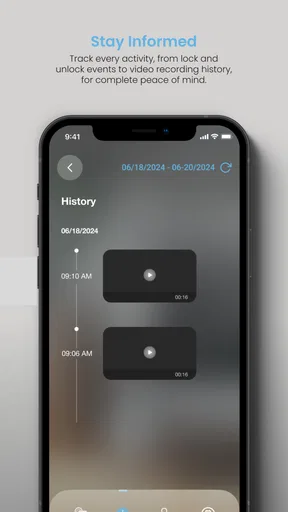
Another noteworthy feature is the real-time alerts. You’ll get a notification whenever the lock is accessed, and that gives you peace of mind. Whether you’re at the office or on vacation, you’ll always know what’s happening at home.
A Few Quirks
While I’m loving the app, it’s not without its quirks. Occasionally, the app takes a moment longer to connect, especially if the Wi-Fi is acting up. It’s not a dealbreaker, but it’s something to keep in mind. Also, the app could use a few more customization options to cater to different user preferences.
Worth Reading Before You Choose

EA SPORTS FC Mobile 26 Is a Bigger Football Game, but It Takes Time

Flipboard Shows What News Apps Must Do Beyond the Feed

Switching to Android Auto Means Rethinking Your Driving Routine

Google Calendar Makes a Crowded Week Easier to Manage

Ludo King Makes the Most of the Minutes Between Plans

Baby Panda World Brings Quick Play to Modern Phones, but Its Game Library Feels Busy
But hey, no app is perfect, right? The team behind Lockly Home seems to be actively working on updates, which is promising. They’re clearly listening to user feedback and continuously improving the app.
Final Thoughts
So, is Lockly Home worth it? In my book, absolutely. It’s a robust app that brings convenience and security to your fingertips. With its user-friendly interface, handy features, and reliable performance, it’s a solid choice for anyone looking to enhance their home security.
If you’re someone who values peace of mind and wants to keep things simple yet secure, give Lockly Home a shot. It’s a smart investment that’ll leave you wondering how you ever lived without it.
Pros
- Intuitive user interface for easy navigation.
- Multiple access methods for flexibility.
- Advanced security features for peace of mind.
- Seamless integration with smart home systems.
- Real-time alerts enhance security monitoring.
Cons
- Initial setup can be time-consuming.
- Requires stable internet connection.
- Limited compatibility with older devices.
- Subscription needed for premium features.
- App updates can cause occasional glitches.
FAQs for Lockly Home
What is Lockly Home and how does it enhance home security?
Lockly Home is a smart home security app designed to work with Lockly’s smart locks and security devices. It enhances home security by providing features like remote lock/unlock, real-time notifications, and access logs. Users can manage access with fingerprint ID, PIN codes, and more, ensuring robust security and convenience.
Does Lockly Home require a subscription or additional fees?
Lockly Home does not require a subscription for basic functionalities. However, certain advanced features or integrations with other smart home systems might incur extra costs. It’s advisable to check the app’s settings and the official website for any optional premium services or features that may require a fee.
Is Lockly Home compatible with other smart home devices?
Yes, Lockly Home is compatible with various smart home ecosystems. It integrates well with smart assistants like Amazon Alexa and Google Assistant, allowing users to control their locks via voice commands. Compatibility with other smart devices may vary, so checking the app’s compatibility list is recommended.
How secure is the Lockly Home app in terms of data privacy?
Lockly Home prioritizes user privacy with advanced encryption to protect personal data and access logs. The app uses secure cloud storage and offers multi-factor authentication to ensure that only authorized users can access the lock settings and data. Regular updates also enhance security protocols.
Can Lockly Home be used by multiple users, and how is access managed?
Yes, Lockly Home supports multiple users, making it ideal for families or shared living spaces. Access can be managed by assigning unique PIN codes or fingerprint access to different users. The app allows the primary user to monitor usage and modify permissions, ensuring controlled access at all times.


